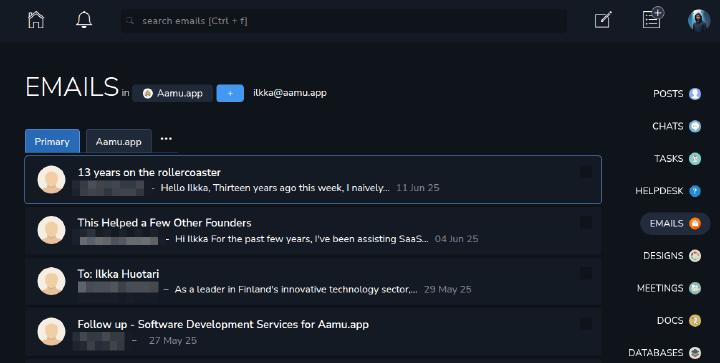
Short answer: An overview of Aamu.app Emails: shared project inboxes, contacts, drafts, attachments, tasks, and human-reviewed Email API workflows.
Aamu.app Emails is a shared, project-based email workspace for teams. It gives a project its own mailbox, keeps conversations in the same place as the rest of the work, and connects email threads to contacts, tasks, tags, comments, files, and automations.
Use Emails for project-related correspondence such as partner discussions, invoices, sales and operations.
Email belongs to a project
Emails in Aamu are organized by project. A project can have its own email address, and the Emails app shows which project you are currently working in. You can switch projects from the project picker, and the sidebar shortcut for Emails is 6 when the Emails app is enabled for the team.
This project model matters because the same team can run different mailboxes for different purposes: for example customer onboarding, invoices, partner conversations, hiring, or a product-specific mailbox.
Setting up domains and addresses
Before a user can send and receive email in a project, the team needs an email domain and the project needs an email address.
Aamu supports two domain setups:
use Aamu.app's own mail server for the domain, with DNS records for MX, SPF, DKIM, and DMARC, or
connect a third-party IMAP/SMTP mailbox by entering the receiving and sending server settings.
Team admins manage domains from Team settings. Once a domain is available, the project email settings let a user set the local address and display name. IMAP-based domains also require mailbox credentials from the current email provider.
If the mailbox is not connected, Aamu shows an error and links back to email settings. There is also an option to open the mailbox connection again from settings.
The main email view
The main Emails view is built for triage. You get a project heading, a compose button, the active mailbox address, search, tabs, unread counts, and an infinite-scrolling list of conversations.
When a mailbox is configured, pressing c composes a new email. The visible compose button has the same shortcut hint.
The list shows conversation state at a glance: sender or recipient, subject, snippet, tags, unread state, draft state, star state, attachments, project information when needed, and the latest update time.
Tabs and routing
Aamu uses tabs to keep incoming email organized. Primary is always present. You can add custom tabs for things like partners, leads, newsletters, invoices, or whatever categories fit the project.
There are also built-in views for Drafts, Sent, Starred, Spam, Trash, and Contacts.
The Unknown tab is important when Aamu does not yet know what to do with a sender. When you open an unknown conversation, Aamu asks where messages from that contact should go: Primary, one of your custom tabs, or Spam. That decision updates the contact, so future messages from the same sender can be routed consistently.
Tabs can be managed from Email settings. Deleting a custom tab moves its email back to Primary instead of deleting the conversations.
Reading and replying
Opening an email shows the full thread, sender and recipient information, timestamp, the current tab/type, star control, tags, attachments, and a menu for related actions.
Replies are handled through the conversation area. Aamu keeps the reply connected to the email thread, includes the configured email footer, supports attachments, and sends through the configured project mailbox.
New draft emails use Aamu's rich text editor and contact picker. You can search existing email contacts while adding recipients, add a subject, write the body, upload attachments, and send.
Sending has a short delay with an undo option. If you notice a mistake immediately after clicking Send, you can undo before the message is actually sent. You can also choose to send immediately.
Attachments and images
Email attachments are stored as files in the email thread. You can attach files while composing, see files attached to received messages, and use attachments when replying.
Remote images are contact-aware. A contact can be marked as allowed to show images, which gives teams a more deliberate way to handle image loading in email content.
Contacts
The Contacts view is a first-class part of Emails. Contacts can be created manually, opened from an email, searched, tagged, edited, and imported from a Google CSV file.
Each contact can have a name, email address, notes, tags, image-loading preference, and a routing tab. The contact page also shows the conversations associated with that person, so it becomes a lightweight relationship history for the project.
Bulk contact actions support tagging, which is useful when importing or cleaning up a larger contact list.
Bulk actions and keyboard flow
Email lists support selection and bulk actions. Selected conversations can be moved to spam, moved to trash or restored from trash, and marked as read.
Keyboard shortcuts make the same workflow faster:
ccomposes a new email,!marks email as spam where that action is available,xmoves email to trash or restores it from trash in the relevant context,rmarks email as read, andarrow keys plus list selection shortcuts help move through email and contact lists.
The safest way to learn the shortcuts is to look at the button tooltips. Aamu shows the shortcut next to the action when one is available.
Connected work
Email threads are not isolated from the rest of Aamu. From an email you can create a linked task, add tags, attach files, copy addresses, inspect the original raw email, and keep the conversation connected to the same project where the rest of the work happens.
Email API
Emails are exposed through Aamu’s Team API for inbox workflows, contacts, drafts, AI-assisted replies, and explicit sending.
GET    /api/v1/emails/
POST   /api/v1/emails/
GET    /api/v1/emails/EMAIL_ID
GET    /api/v1/emails/actors/ACTOR
GET    /api/v1/emails/contacts/
POST   /api/v1/emails/drafts/
PUT    /api/v1/emails/EMAIL_ID/reply-draft
DELETE /api/v1/emails/EMAIL_ID/reply-draft
POST   /api/v1/emails/EMAIL_ID/reply-draft/generate
POST /api/v1/emails/EMAIL_ID/reply-draft/sendSend x-api-key, x-project-id, and usually x-aamu-actor. The actor selects the project mailbox and owns the user-specific draft. The actor endpoint can verify the mailbox configuration without exposing credentials.
Integrations can create a new outbound draft, send a new email, or prepare a reply draft for human review. Sending remains an explicit operation: generating or writing a draft does not send it. AI draft generation can retrieve Team Brain context, in which case the key needs Emails write permission and Team Brain read permission.
Database automations can also use a configured email template. Managing that automation requires Automations write scope, and the send_email action requires Emails write scope for its target project.
When to use Emails instead of Helpdesk
Aamu has both Emails and Helpdesk, and they are meant for different shapes of work.
Use Emails when the mailbox is a shared project inbox: operational messages, partner threads, invoices, sales conversations, or internal-facing workflows where the conversation itself is the main object.
Use Helpdesk when you need support-ticket behavior: ticket states, assignment, internal notes, customer-facing support workflows, live chat, knowledge sources, and AI-assisted draft handling.